I tried out the HeadshotPro AI headshot generator to see if it’s worth your time and money!
I’ll share my results, what I liked, what I didn’t, and the pros and cons of using it.
Here’s what happened!
Disclaimer: This post has affiliate links at no cost to you.


HeadshotPro briefly
HeadshotPro is a web-based AI tool that turns your selfies into sharp, professional-looking headshots you can use on LinkedIn, your resume, or social media.
It can place you in different business settings and outfits — even if your original selfie was snapped at home in pajamas.
This way, you skip the cost and hassle of hiring a professional photographer.
How to use it
To create AI headshots with this tool, go to their website and pick a plan.

Now, let’s start creating your headshots!
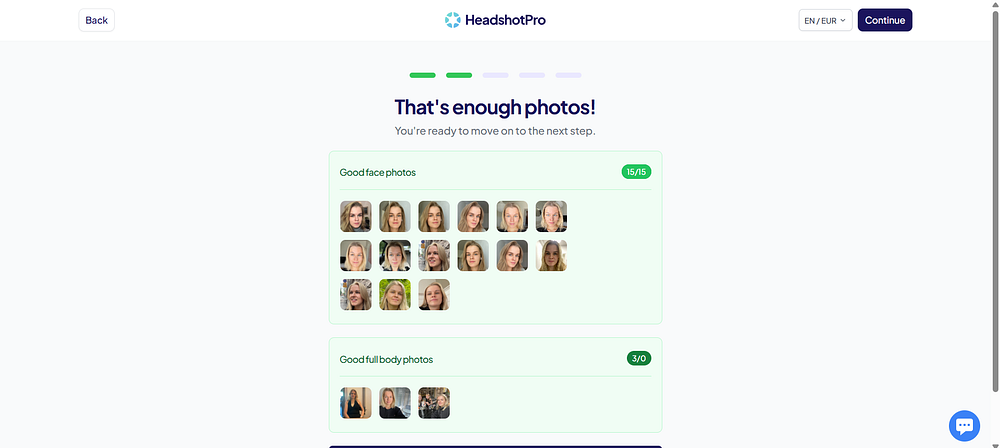
The first and most important step is uploading your selfies, because the quality of these photos will affect the results.
Pick selfies that really show you well — it’s worth taking a little extra time here.
HeadshotPro will also ask for some personal details, like your height, hair and eye color, and ethnicity.


Uploading 15 photos of myself was a bit tricky, since I don’t really post on social media and don’t have a lot of good selfies lying around.
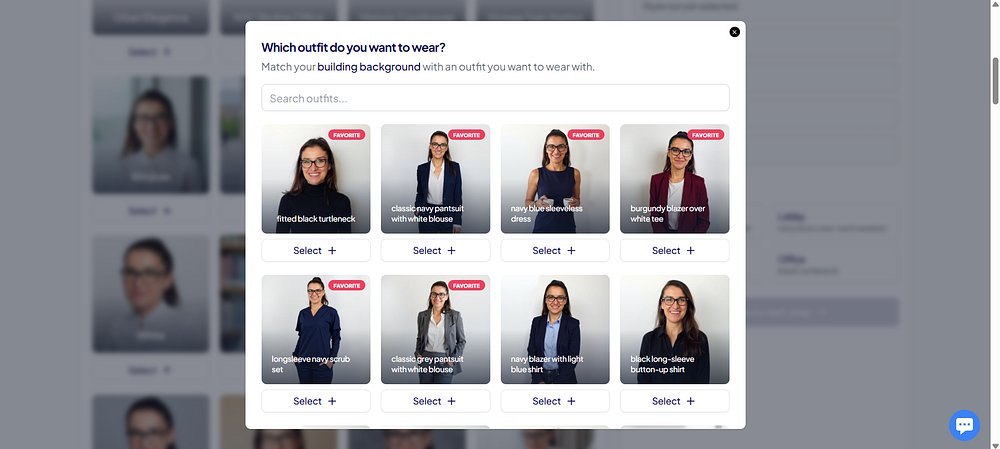
Next, you pick the background and outfit combinations for your headshots. How many you can choose depends on your plan. I had the Professional Plan, so I got to pick 10 different styles.
The “Choose for me” button in the corner was a lifesaver! It saved me time since picking all the combos by hand can take a while.

For me, the whole process took around 2 hours to finish. Pretty quick, if you ask me.
With the Executive Plan, the turnaround time is even faster — just about 1 hour.

Results
Now, let’s take a look at my results and what I thought of them.
When your headshots are ready, the tool gives a heads-up about “duds.” These are the shots that look off or make you look strange — pretty common with AI generators.

Here’s the real me — one of the selfies I uploaded. It’s a pretty recent one.

Overall, it turned out pretty well.
I used the “Choose for me” option for the backgrounds, which is why there’s a patriotic US flag behind me.

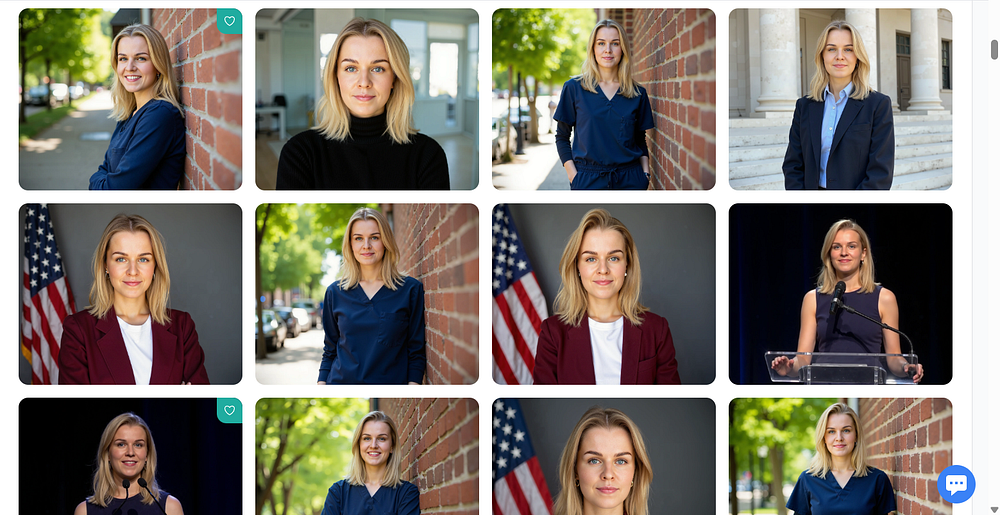
The full-body shots have slightly odd proportions, but my hair came out looking great.
The headshots are really polished — maybe even a little too perfect for my taste.
These ones are probably my favorites!


I have to admit, these look like “yassified” versions of me — kind of like I’m wearing a beauty filter.
I really like the preview feature, though. It lets you see how the headshot would look as your LinkedIn profile pic or email signature.


It really captures me with a calm expression, though a bigger smile — like showing my teeth — looks a bit off.
That’s probably because I didn’t upload many selfies with my teeth showing.


Edits
With the Professional and Executive plans, you get credits that let you edit and remix your headshots.


Let’s try changing my facial expression to something a bit happier or more cheerful.

It’s not perfect, but it probably would have turned out better if I’d uploaded more selfies with my teeth showing.

Next, let’s try making the background transparent!

I don’t know, I feel like I could have probably done this myself and gotten better results.
Still, it looks good as a small icon!
Pricing & Value for Money
These are the current plan options HeadshotPro offers. I went with the Professional Plan.
They also have plans for teams.
If you’re not in the US like me, the price in euros ends up being higher because the exchange rate isn’t 1:1. So it’s better to pick the price in USD.
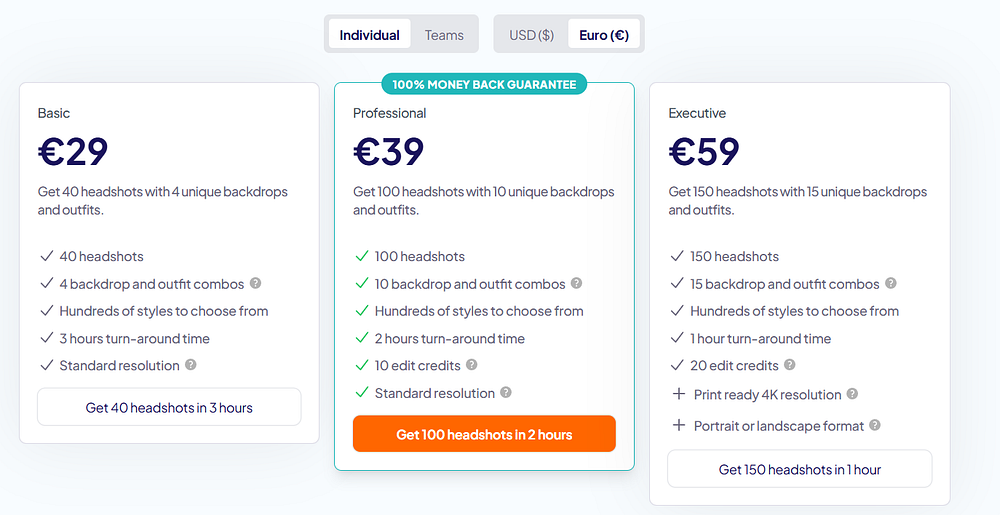
In my opinion, the Basic and Professional plans feel reasonably priced.
Go with the Basic plan if you just want a few good shots for social media and don’t plan to edit them later.
The Professional Plan is better if you want a larger set of headshots and maybe want to tweak them a bit.
Either way, it’s definitely cheaper and faster than hiring a real photographer.
Pros
- Lots of background and outfit combos to pick from.
- Easy-to-use features like “Choose for me” and the LinkedIn-icon preview.
- Quick turnaround (about 2 hours with the Professional Plan).
- Headshots look sharp and professional.
- Very few had obvious oddities, like weird hand positions.
- Didn’t make me look older.
- Headshots look great as small icons.
Cons
- Some shots feel a bit repetitive.
- The edit feature isn’t that impressive.
- Headshots are a little too polished for my taste — kind of like there’s a beauty filter on.
My final thoughts
ChatGPT said:
HeadshotPro delivered high-quality headshots in just about 2 hours.
You can customize the background and style yourself, or let the tool pick for you and save some time.
The headshots look professional, sharp, and well-lit, and most of them are very accurate. I’d definitely use them for LinkedIn or any other professional profile.
The tool didn’t handle other facial expressions very well, so some shots felt a bit repetitive. They also come out a little too polished. My hair looked great, though. The edit feature didn’t work that well for me — I tried making my expression happier and removing the background entirely, but the results weren’t perfect.
Overall, it’s a good, fairly affordable option if you want good-quality headshots for social media or your resume.
