I tested a new tool called The Influencer AI. It creates AI characters that you can use as influencers for content.
You can either build a new influencer with a custom look, or make an AI version of yourself.
Let me show you how it works, the results I got, and what I think of it.
Disclaimer: This post has affiliate links at no cost to you.
My Experience
To get started, just sign up for The Influencer AI.

Next, choose one of the options:
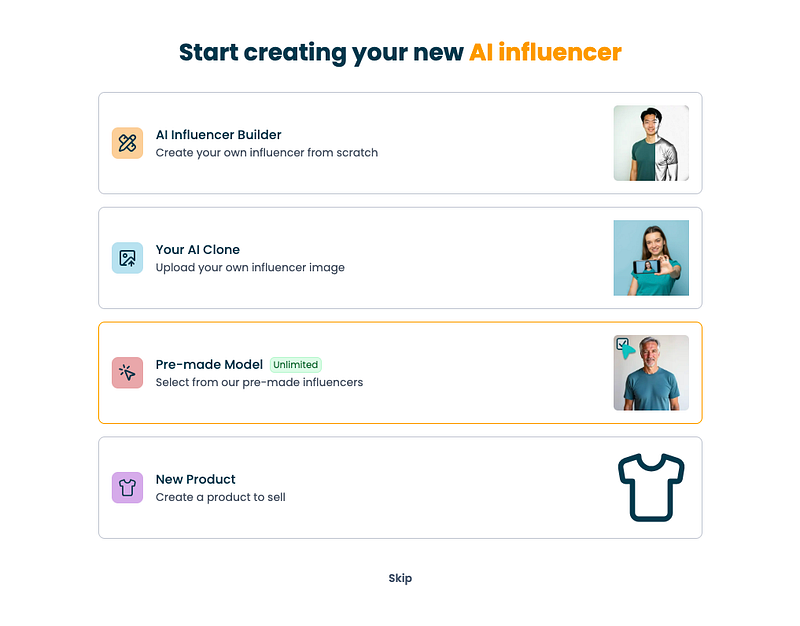
With this tool, you can:
- Create a custom influencer from scratch
- Clone yourself and generate images of you doing anything
- Use a pre-built model
- Create a product to sell
In this guide, I’ll focus on the first two.
I began by building an AI influencer from scratch.

When I started, the tool asked me to set the characteristics of the influencer.

I gave the influencer my name and set traits to make it look like me.
Here’s the image it created:

I liked the result, so I clicked “Create AI Influencer” to get started.

It took around 4 minutes for the AI to build my influencer profile.

Don’t forget to refresh the page to see your influencer profile.

After your influencer is ready, you can start making content with it.
For example, I asked it to create an image of my influencer “chilling at the beach.”

About 30 seconds later, these were the results:

Pretty cool, right?
The images look just like my influencer, so the character stays consistent.
But I wanted a full-body shot.
To customize the images, you can upload a reference photo.
For example, I used one from Unsplash:

Then I asked the AI to make an image similar to the one I had in mind.
Here’s the result:

Here’s the full picture:
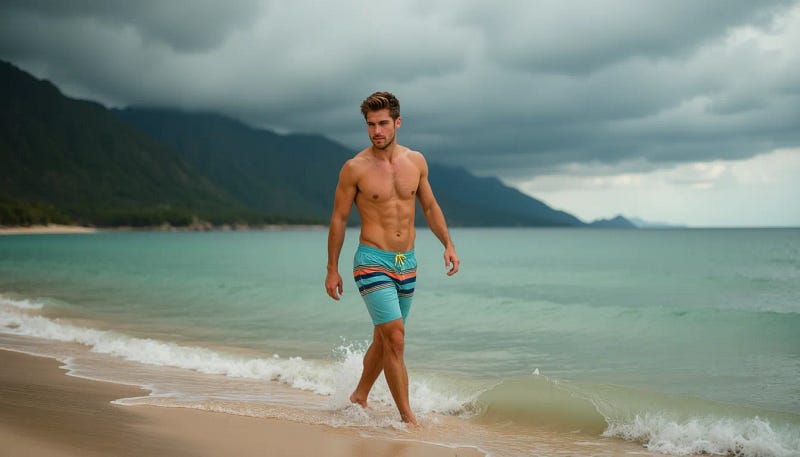
Pretty cool, right?
If the quality isn’t sharp enough, you can upscale the image to make it clearer.

Now let’s move on to the video generator.
The Influencer AI can make not just photos but also simple videos with your influencer.
To try it, click “Create new video” under the Videos tab.

To make a video, first choose a base image. The AI will then turn that image into a video as if the scene continues from it.

Here’s what I did: I picked one of the new AI beach images and asked it to make a 10-second clip of “man walking on the beach.”

I didn’t think this would work at all.
But I was wrong. Here’s the clip it made for me:
That’s really good. It looks realistic and well shot.
I also saw that you can add lip-sync to your clips, meaning your AI influencer can say anything you want.

To be fair, the lip-sync didn’t work that well. The tech still needs some work before it feels right.
So let’s leave this influencer for now, because there’s something even more impressive I had to try — the “Your AI Clone” feature.
With this, you upload a set of selfies so the AI learns what you look like.
It then creates headshots and other photos that look just like you in any setting.

To make your clone, first enter your details. Then upload several images for the AI to use.

Here are a few of the images I uploaded:

Once your clone is ready, you can start making photos and videos of yourself. Pretty cool.

Here’s the first AI photoshoot I tried:

Pretty cool, right?
I did notice that some images don’t come out in great resolution. There are two ways to fix this.
First, you can use the upscaler tool built into The Influencer AI.

The downside is that sometimes the upscaled images look too smooth.
For example, here’s one I created and scaled up:
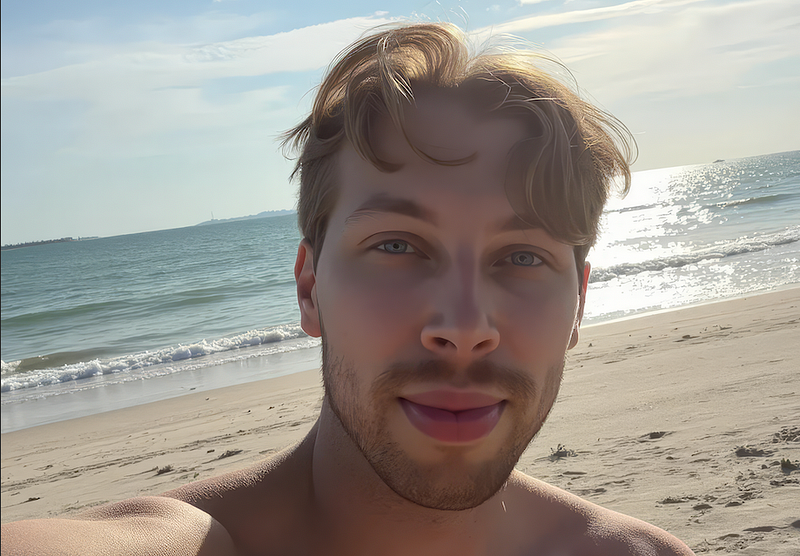
If you zoom in, you’ll see the skin looks way too smooth. Almost like a painting.
To fix this, you can use a tool like Canva to sharpen the photo with simple controls.

Honestly, I think the second option gives better results. It takes an extra 30 seconds, but it’s worth it.
If you’re posting on social media, you can also use the built-in editors there to sharpen your images.
Speaking of edits, The Influencer AI has its own AI editing tools you can use to tweak your photos.
To try them, click “Edit photo” on one of your images.

For example, I asked the AI to turn it into a sunset.

Here’s the result:

Pretty cool, huh? Though in this shot, it kind of looks like I spent the whole day in the sun without sunscreen.
Another handy feature is “Try on clothes.” It lets your AI influencer or clone wear any outfit.
For example, I grabbed some clothing images from Unsplash:

Just upload a clothing image and the AI does the rest.
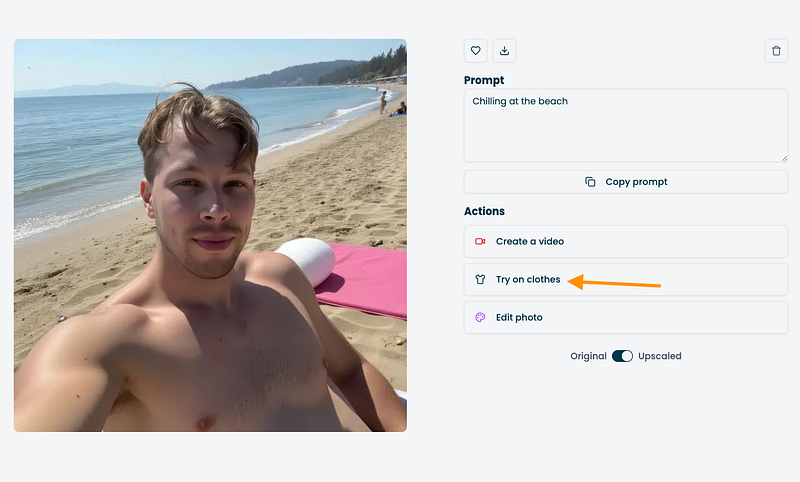
Here I uploaded an image of a cool-looking shirt:
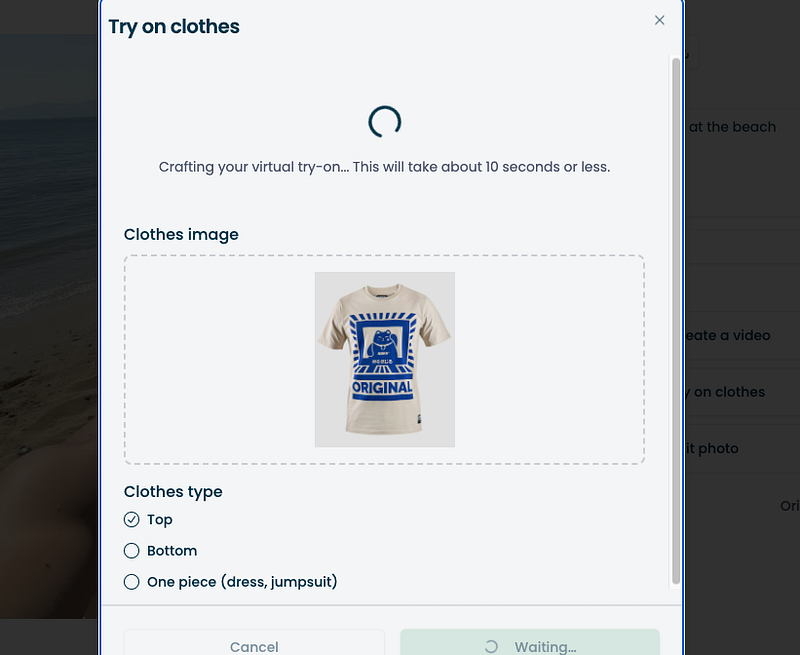
But the tool told me I need my whole body visible to try it on.

So I chose a different image:

And here’s what I got:

That’s epic, right? At first glance, it looks just like the real piece of clothing. And the image looks just like me.
Now let’s test the AI video feature on my clone. This is the part I was most excited about.

First, the tool asks you to crop the frame for the video.

Next, set the video length and describe what you want in it.
For example, I made a 5-second clip of “me walking on the beach.”

Here’s the result:
I mean, come on — isn’t that incredible? A few years ago I wouldn’t have believed this was even possible.
Now let’s see how well the AI handles a more complex scene.
This time I tried making a video of me running on the beach with a bunch of dogs.

Here’s the prompt I used:

And here’s the result:
Well, that one failed.
At first it looks like I’m waiting for the dogs, but then my hair covers my face, and it seems like I’m facing forward and backward at the same time.
So yeah, complex scenes give the AI some trouble.
For the best results, it works better if the video just “continues” what’s already happening in the base image. That gives the AI the best chance to get it right.
For example, this beach clip turned out nice:
Still, even if you stick to that, the more movement and complexity you add, the less accurate the videos turn out.
For example, here are a couple of clips where I asked the AI to make a video of me throwing a disc golf disc.
Honestly, I have no idea what’s happening in those videos — but I can tell you I’m definitely not throwing a disc golf disc.
That said, I didn’t expect these tools to get this right yet. I’ve never seen them even come close. Maybe in a year or two they’ll handle complex stuff better.
For simple use though, The Influencer AI is solid. You can try on clothes, place yourself anywhere, and more. It’s way better than I expected.
Pros
- Easy setup — sign up, pick an option, and create your influencer or clone in minutes.
- Consistent character — the look stays the same across different images, which many tools struggle with.
- Fast generation — most photos take less than a minute to make.
- Good simple videos — short clips look smooth and realistic enough to fool someone.
- Try-on feature — you can make your influencer wear almost any clothing.
- Built-in editing — adjust lighting, backgrounds, and more inside the tool.
- Image upscaler — improve quality if the default resolution isn’t great.
- Futuristic feel — seeing yourself walking on the beach or in new outfits is epic.
Cons
- Complex videos fail — extra movement or busy scenes usually break down.
- Over-smooth upscaling — some enhanced photos look more like paintings.
- Lip-sync is clunky — making your clone talk doesn’t look natural yet.
- Low resolution — some images come out blurry, even with upscaling.
- Motion in video — anything beyond simple scenes often turns out weird and uncanny.
Pricing
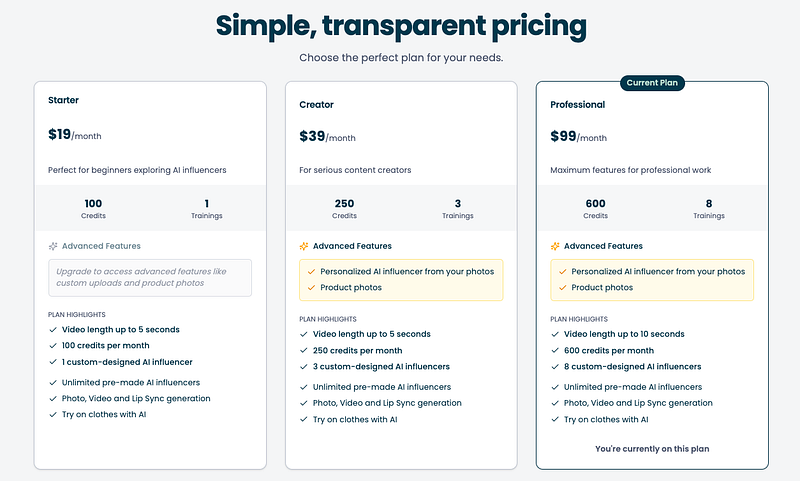
- Starter ($19/month): 100 credits, 1 custom influencer, 5-second videos, no advanced features.
- Creator ($39/month): 250 credits, 3 custom influencers, 5-second videos, includes personalized influencers and product photos.
- Professional ($99/month): 600 credits, 8 custom influencers, 10-second videos, all advanced features included.
To Take Home
The Influencer AI is an easy and surprisingly good tool for creating a clone of yourself or a virtual influencer.
It’s quick, fun to play with, and makes realistic photos and simple videos in just minutes.
Complex motion, detailed scenes, and lip-sync still need more work.
But for basic content — new outfits, different places, or short clips — it works better than you’d think.
Thanks for reading! 🙂
