I’ve tested a bunch of AI resume builder tools, and one of my favorites is called SheetsResume.com.
It’s affordable, easy to use, and the story behind it is fascinating.
In this post, I will show you how to use SheetsResume to create an epic resume in a couple of ways.
Disclaimer: This article is reader-supported. If you choose to pay for the tools listed in this article, I might earn a small commission at no cost to you.
1. Create Based on Your LinkedIn
To create a resume with Sheets AI, head over to this page.

#2 Pick LinkedIn
Let’s use LinkedIn in the first example.
To create a resume based on your LinkedIn profile, pick “Start with your LinkedIn profile” on the right-hand side.

Then, head over to LinkedIn, visit your profile, and copy the URL.

Paste the URL to this view:

The SheetsResume AI visits your LinkedIn profile and checks your information and experiences, and creates the first version of your resume based on that.
#3 Open The Editor
Once the first version of your resume is ready, you’ll see a view like this:

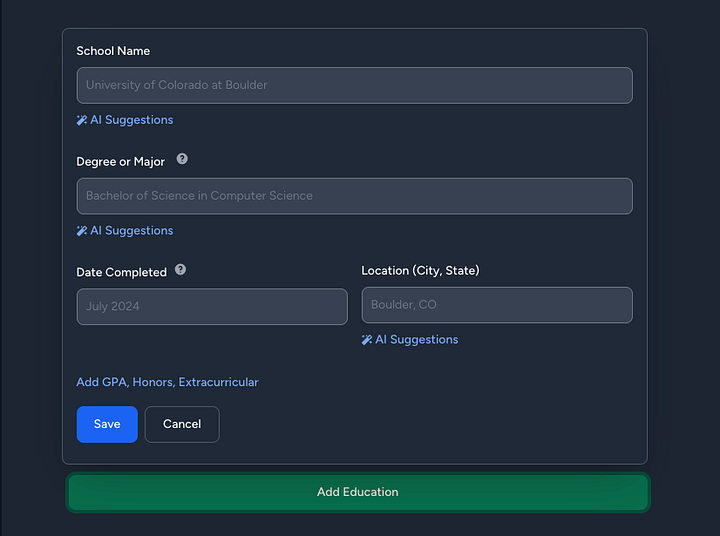
On the left-hand side, you can fill in the details that the tool asks for. These include name, email, work history, education, and so on.

On the right-hand side, you see the preview of your resume in real time. This means any change you make on the left will instantly show up on the right.

That’s neat because you don’t need to jump between windows or hit the refresh button.
#4 Fill in Your Details
For best results, make sure to enter your details for every section.

Feel free to move things around in the editor by dragging and dropping the elements.

#5 Write with AI
SheetsResume lets you use AI to write parts of your resume.
Just as an example, in the experiences section, you can fill in your company name and job title, and then ask AI to create a better description.

#6 Change Titles with AI
You can also use AI to make your title more attractive, especially if you’re targeting a particular role.
For instance, when I entered “Coder” and selected “AI Suggestions,” it generated a range of improved options.

#7 Find Certifications with AI
You can also rely on AI to find relevant, industry-specific certifications.
For example, if your resume highlights your experience as a software developer, you can use AI to search for certifications in your field and include the ones you’ve earned.

#8 Pick Hobbies with AI
In the interests section, you can simply use the AI-generated hobbies and interests rather than entering them manually.

#9 Tweak Settings
And don’t forget to adjust the settings as well.
Even though there’s just one resume template, you still have plenty of customization options to work with.

For example, you can do layout optimization, reorder your resume sections, choose a different font, and you can get those AI suggestions too.

#10 Purchase the License
When you’re finished, you can go ahead and purchase your AI-generated resume.
As of now, the cost is $99, which is a one-time payment for lifetime access — unlike many other tools that charge ongoing subscription fees.

#11 Download It
Once you’ve paid for the resume, you can download it and use it to land your next job!

That’s how you create a resume based on your LinkedIn profile.
But if you’re not using LinkedIn, let me show you how to create a resume from scratch or based on your existing resume.
2. Create from an Existing Resume
Another way to use SheetsResume is to create a new resume based on your existing resume.
To do this, open up SheetsResume.com and pick the first option from the stack on the right.

Then, drop your existing resume to this view:

Then tell the AI what kind of job you’re hunting.

Hit “Generate Resume” to start creating.
Then, enter the missing details, add more experiences and projects you’ve worked on, and make sure the text says what you want it to say.

And because it’s an AI resume builder, you can refine the sections using the AI chatbot feature.

For example, here I’ve opened up the chat and let the tool ask me more relevant questions about the resume.

Then the AI produced a better version of that section and asked if I’d like to use that in the resume instead.

When I clicked “Update Work Experience”, the tool neatly added the new information to the resume.
Tip: For easier access, click the parts of your resume in the preview to edit specific sections of it.

Just fill in all the necessary information and spend some time on the resume to make it stand out.
3. Create From Scratch
SheetsResume also lets you create your resume from a complete scratch.

If you choose this option, be prepared to spend some time creating your resume.

You can always use AI to help with every step of the way, though.
For example, you can create your work history page by filling in information and asking AI to complete it and to make it sound professional.

Of course, if you don’t want to use AI, just create it traditionally by filling in the information and moving on to the next slide.
Don’t forget about the AI suggestions. These can be useful if you’re not sure how to describe your previous roles, skills, interests, or anything.
Can’t Afford It?
SheetsResume is awesome. If you can’t afford it, you have options:
- Free memberships are offered to U.S. government workers affected by DOGE — just contact team@sheetsresume.com.
- Financial hardship support: If the $99 lifetime pass is unaffordable, email team@sheetsresume.com for a free 7-day membership to complete your resume.
- Vocational discounts are added during checkout for students, military personnel, teachers, and government workers.
- A free DIY resume template used by millions is available at SheetsResume.com/resume-template.
Write Your Cover Letter with AI
If you need a cover letter for your resume, you can do that with SheetsResume AI writer, too.
Just pick tools from the top right.

And choose the AI Cover Letter Writer, which is free, by the way!

I tested it, and the result gives you a good direction when it comes to the language, format, and layout.

However, as you can imagine, with AI, the results are a bit generic.
Make sure to add your touch to it to make it count and to make sure everything is correct.
You can only imagine how many cover letters companies get where they can instantly tell that this is AI-written 100%. That’s something you don’t want to do.
SheetsResume: Pros and Cons
Pros
- Affordable lifetime access — One payment, no ongoing fees
- Easy to use — Clean interface, no design skills needed
- AI-powered writing — Drafts experience and summaries fast
- LinkedIn import — Build a resume in seconds from your profile
- Real-time editing — See changes as you type
- Customizable — Rearrange sections and adjust layout
- Free cover letter tool — No extra charge to create a cover letter
Cons
- One resume template — Limited visual variety
- No mobile app — Must use on desktop
- Some AI suggestions feel generic — You’ll need to edit to stand out
- Limited styling options — Fewer design tweaks than some tools
- Upfront cost — $99 can be steep if you only need one resume
Quick Tips to Make Your Resume Stand Out
Even if you’re using a solid AI resume builder like SheetsResume, a few small tweaks can make a big difference:
Tailor Every Resume
Don’t send the same resume everywhere. Change your title, summary, and skills for each role. Most companies use software to scan resumes before a human ever sees them.
Example: If you’re applying for a Project Manager, make sure it says Project Manager at the top and lists tools like Asana or Jira if the job post mentions them.
Focus on Outcomes
Show what you did and why it mattered. Results stand out more than tasks.
Example: Instead of “Handled customer support,” write “Resolved 100+ customer tickets weekly with a 95% satisfaction rate.”
Keep It Clean
One page is enough for most people. Use clear headings, white space, and a simple font. No graphics or tables — many systems can’t read them.
Tip: Always save your resume as a PDF so the layout stays intact.
Highlight Relevant Skills
Put the most important skills and experience at the top of your resume. Most recruiters skim fast.
Example: If you’re applying for a developer job, list programming languages and projects first, not hobbies.
Proofread Everything
Small mistakes can cost you interviews. Run spellcheck and read it out loud.
Tip: Watch for things like mixed date formats and extra spaces.
Customize Your Cover Letter
Even a short, specific cover letter helps. Use AI to draft, then tweak it so it sounds like you.
Example: Mention something real about the company. “I admire [Company Name]’s work in renewable energy and would love to contribute to your next project.”
Hope you like it.
Thanks for reading, and I wish you the best of luck in your job hunt!
