I tried out the InstaHeadShots AI headshot generator to see if it’s worth your time and money.
In this post, I’ll show you my results, what using it was like, the pros and cons, and more.
Disclaimer: This post has affiliate links at no cost to you.

InstaHeadShots in brief
InstaHeadShots is an AI tool that turns your selfies into professional-looking headshots.
It saves you the time and hassle of hiring a photographer or booking a studio.
You can pick from different styles and backgrounds to fit your personal or professional look.
In about an hour, your new headshots are ready to use on LinkedIn, social media, or anywhere else you need them.
How to Use It
Let’s go through how to use InstaHeadshots to create your AI headshots.

Create an account (I used my Google account) and start your profile by answering a few questions.

Next comes the most important step—picking your selfies.
Take some time to choose the best ones that really show who you are.
These will decide how good and accurate your headshots turn out.


After uploading your selfies, start a new photoshoot.
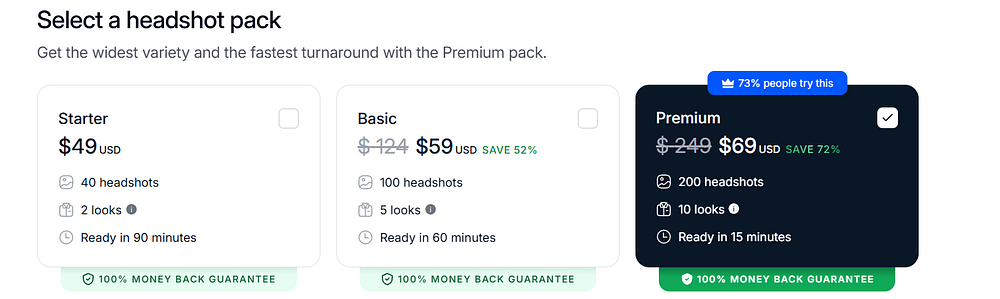
With the Premium plan, you can choose up to 10 different looks.

The turnaround time depends on your plan.
With the Premium plan, it can be as fast as 15 minutes!
You’ll get an email when your headshots are ready.
Results, Quality & Accuracy of Headshots
Here are my results!
I got 200 headshots in total, with 10 different looks.
At first glance, they look pretty accurate.
There are a few misses, of course, but that’s normal with any AI tool.


This one’s my favorite, even though the outfit is pretty casual.
The earring on my right ear looks a little off, but it’s barely noticeable.

Here’s another one I really like, with a more professional outfit.

The images will have a watermark until you decide to download them.


I mentioned the misses earlier—here are some good examples.
My face looks a bit too polished and obviously AI-generated.
The AI didn’t capture my smile with teeth very well.
To be fair, I only gave it one selfie with my teeth showing.


Edits
InstaHeadShots also has an editing feature for your images, using credits you can buy separately.

You can change the outfit, background, or do touch-ups on your pictures.
I tested it by changing my outfit in this one.

And here’s the result.
It looks a bit unnatural to me, so I prefer the original image.

InstaHeadShots also lets you upscale your images to higher quality for an extra fee.

Pricing & Value for Money
Even though it’s cheaper than hiring a professional photographer, InstaHeadShots is still a bit pricey in my opinion.
The Premium plan gives the best value since the other plans only offer 2 to 5 looks, and the editing options are limited.
Payment is one-time only—no subscription needed.
You can also buy extra credits if you want to do more edits.
If you’re not happy with your results, InstaHeadShots offers a 100% money-back guarantee.

Pros
- One of the fastest turnaround times
- Easy to use
- I got some good and accurate headshots
Cons
- Most headshots looked a bit too artificial
- Editing options aren’t great (I only tried one edit though)
- A bit expensive
Is It Worth It?
InstaHeadShots is a fast and easy-to-use AI headshot generator that turns your selfies into quality headshots in as little as 15 minutes.
Depending on your plan, you get a set number of headshots and can pick your favorites.
I got some images I’d actually use for social media, but many weren’t usable.
A lot of the headshots also looked very AI-generated.
With the limited editing options, I think the tool is a bit pricey.
Rating: 3.8/5
