
I’ve tried a lot of QR code generators, and I’ve found Uniqode to be the best QR code tool for business use.
In this post, I’ll show you how it works, why it’s good, and who it’s for.
Let’s go!
Core Features
Here’s a sneak peek at the core features of Uniqode:
- Editable (dynamic) QR codes
- Real-time scan tracking & analytics
- Bulk QR code generation (up to 2,000 at once)
- Custom branding (logos, domains, templates)
- Integrations with Salesforce, HubSpot, Slack
- Enterprise security: SSO, 2FA, GDPR/SOC2 compliant
- Centralized team and user management
But now, let me show you how it works and what kinds of results it gives you.
My Experience
Let me show you my experience with Uniqode.
The platform is ridiculously easy to use. Simply visit this page to create your QR code for free.
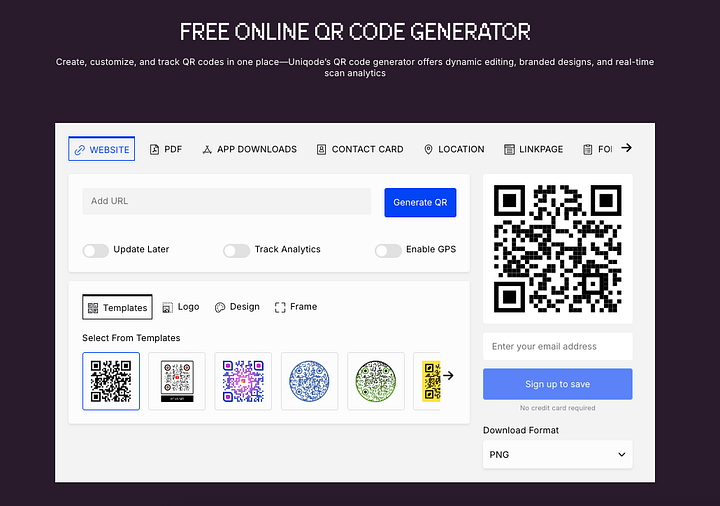
Just as an example, you can enter a website URL to create your card.

This will then create a QR code that, once scanned, brings the person to the URL you specified in the field.

Because it’s a quality platform, there’s not just one QR code, but you can choose one that best fits the mood/your brand.

Notice that you can also:
- Make your QR code updateable
- Track the performance (analytics)
- Enable GPS information

Also, it’s not just a QR code generator for websites. The platform has got you covered, whatever you’re trying to make QR-scannable.
There are PDFs.

You have app downloads.

You can create Contact Cards.

Heck, you can even create a QR code for a location.

There are so many QR code options that you won’t face any obstacles with this platform.

Let me show you a more detailed look at one of the QR codes that I created.
First, I picked the Website QR code option from the above list.

I then chose a QR code template that looked the best for me.

I also customized the QR code URL page, so that it’s not a random, fishy-looking URL.

Then I gave the QR code a name.

And then I published it.

Once I did that, the QR code is now sitting at my QR Codes library from which I can track its performance and do edits to it.

One thing that’s super handy here is that you can download the QR code in all the most common formats.

Also, you can edit the code after the fact. For example, you can duplicate it, create a template, label it, or change the details.

Here’s a full-screen version of my QR code. I may have deactivated it when you’re reading this, so don’t worry if the scanning doesn’t work anymore. It’s just a test QR code anyway.

Now, let’s talk about the analytics of the QR codes you create.
It’s one thing to put a QR code out there, but it’s an entirely different thing to know how it’s performing. That’s something you don’t want to do by guess. Instead, you want to see reliable data on the number of scans, unique scans, locations, and more.
To view your QR code analytics, head over to Viewer Analytics in your QR Codes tab.

- This shows you the number of total scans, whether it’s the same person or multiple persons.
- Also, you get to see the number of unique scans, which lists the number of people that have scanned your QR code.

So, for example, if one person scans your code 100 times, the Total Scans says 100, but the Unique Scanners says 1.
I noticed that this information is updated very quickly. I scanned my QR code 3 times, and it didn’t take more than 15 seconds for the dashboard to reflect that.
Notice that you get a view to more granular analytics too. You can see daily charts. You’ll see the devices used to scan your codes. Also, you’ll see the most active times of the day when your code has been scanned.

Last but not least, you also get to see from where your QR codes are scanned.

Notice that Uniqode is not just a plain QR code platform. Instead, it’s a proper QR code system for businesses. It allows you to create:
- Linkpages — A web page that contains multiple hyperlinks, often used for navigation, promotion, or social media bios.
- Forms—This feature allows for gathering responses from your scanners.
- Digital Business Cards—These replace the physical wallet cards with QR-scannable digital wallet cards you can place in Apple/Google wallet on your smart device.
- Landing pages—This is a basic information-rich, neatly designed website where you can send people from your business cards or QR codes.

If you want to build a link page, there are lots of good-looking templates to choose from.

To build a form, you can watch the tutorial on the forms page.

If you want to create a mobile-optimal landing page for yourself, that’s possible in Uniqode too.

Also, don’t forget about the integrations that Uniqode offers.

Lastly, for the technical readers out there, it’s good to know that once you create your code, it will automatically create an API key for it.
This is useful if you want to integrate your app and create custom QR code campaigns.

Notice that Uniqode also lets you create a digital business card. To do this, just switch to the Cards tab in the dashboard.

For example, here’s a card I created for myself:

You can create these types of cards just by filling in your details, adding/removing buttons, and customizing the colors.
The tool also creates a QR code for your business card, which is handy, since you can save this to your Apple/Google wallet for easy access.

Similar to QR codes, you can track the analytics of your business cards easily with the tool.

Overall, this is a great platform for creating QR codes and digital business cards. As you can see, it meets all your demands, from creating QR codes for many purposes to tracking the performance.
Best Use Cases
Let’s briefly talk about the ideal use cases for Uniqode QR code generator.
Uniqode QR generator might be an overkill for someone who just wants to quickly create a QR code and maybe use it once or twice.
But even with simple technology like QR codes, there are lots of advanced users and use cases I wanted to bring up.
Here are use cases in which Uniqode could be the best tool for you:
- Sales & HR — Digital business cards with lead capture
- Retail & CPG — Smart packaging with dynamic links
- Events — Contactless check-ins using geo-fenced QR code.
- Alcohol & Regulated Goods — Age-gated promotional content
- Restaurants — Multilingual menus and location-based offers
- Education & Healthcare — QR-enabled training, patient access, and resource guides.
Pros
- I find the dashboard easy to use — you can get a lot done quickly without digging around.
- You can update QR codes after printing them, which is super useful for ongoing campaigns.
- The scan tracking is detailed — time, location, device — and it’s all in one place.
- It’s easy to make everything look on-brand with your logo, colors, and custom domains.
- Support is great. Based on my research, you get quick replies and helpful answers every time you reach out.
Cons
- The cheaper plans are pretty limited — some useful features like custom domains or longer data retention are only on the higher tiers.
- If you just want a basic QR code with no tracking or branding, this is probably more than you need.
Pricing

- Starter — $5/month: 3 dynamic QR codes, 30-day analytics, for solo use.
- Lite — $15/month: Up to 50 dynamic codes, 60-day analytics, basic branding features.
- Pro — $49/month: 250 codes, 90-day analytics, GPS tracking, CRM integrations.
- Plus — $99/month: 500 codes, 180-day analytics, multi-user access, advanced branding.
- Enterprise — Custom pricing: Unlimited everything — SSO, custom domains, team management, and full support.
To Take Home
If you’re using QR codes as part of your workflow in marketing, HR, product, or events, Uniqode is a great platform for you.
You can edit codes after they’re live, track everything in detail, manage users, and keep it all secure.
The interface is simple, and the support is responsive.
Just notice that it’s not the cheapest option out there. If you just need a basic QR code with no tracking, you can probably use something free.
But if you care about branding, analytics, or scaling across a team, this is a reliable tool that covers everything you need.
