In this post, I’ll show you the best AI writers on the market. I tested them all to save you time and money.
Now let’s get into the reviews and see the results I got with each tool.
Disclaimer: This article has affiliate links at no cost to you.
AI SEO & Blog Writers

Let’s start with blog post and SEO content writers.
1. ContentShake AI

Contentshake AI writes SEO blog posts from scratch. Just tell it what you want to cover, and it creates the content.
First, enter your idea.

Next, set your target audience, choose the length, and add the subtopics you want to cover.

Wait for 5–10 minutes for the AI to create your content.

After this, you’ll see the AI-generated writing.

It also adds stock images as placeholders, pulled from Unsplash.
You can edit your posts with or without AI to make them your own.

This tool saves time, especially if you’re new to SEO.
But it’s not autopilot.
You still need to know your topic and add your own experience if you want results.
I’d treat these as drafts. You’ll need to edit a lot—adding your images and expertise helps.
That said, it’s great for beating writer’s block. It writes like a decent freelancer, so instead of hiring someone, you can just use Contentshake.
Pros
- Easy blog starts: give a topic and get an SEO outline fast.
- Helps with keywords and on-page optimization.
- Beginner-friendly if you’ve never written long guides.
- Auto-adds stock images so drafts don’t look empty.
- Works inside Semrush with the rest of its tools.
Cons
- Not autopilot — you still need expertise and editing.
- Output feels generic without your own input.
- Briefs and subtopics can be tricky if you’re new.
- Stock images are placeholders — you’ll replace them.
- Community view: “Helpful, but don’t rely on it blindly.”
Pricing
ContentShake is part of Semrush’s Content Toolkit add-on, starting at $60/month on top of a Semrush plan.
2. ChatGPT

I know it’s boring, but I had to include ChatGPT.
There’s a lot of hype around new AI writing tools.
But most of the time, ChatGPT is still the best for pure writing.
For me, it’s a go-to chatbot and especially helpful for beginners.
Just sign up, ask a question, and it gives you an answer.

You can for example ask it to write a blog post outline.

You can also use ChatGPT to simplify or summarize blog posts. This is what I use it for most, since I often write things that are too hard to read.
AI does well here.
And don’t stress about prompts. That’s mostly hype. Anyone can write them. If you don’t know how, just ask the AI to show you.
But remember: these tools won’t do your job.
For me, AI saves maybe 1–2% of my time. It helps with rephrasing, simplification, and some basic research. That’s it.
In writing, the value isn’t the text — it’s the expertise and experience you bring. If you don’t put in the work before writing, you won’t get results.
Pros
- Fast drafting: outlines, intros, summaries in seconds.
- Flexible: from blog ideas to code snippets to emails.
- Beginner-friendly: just ask and refine.
- Team features: shared workspaces and admin tools.
- Works on web and mobile.
Cons
- Can make things up — you need to fact-check.
- Tone can sound generic if you don’t guide it.
- Not a replacement for expertise.
- Rate limits and model updates can affect results.
- No automatic citations.
Pricing
- Free
- Plus: $25/month
- Pro: $200/month
AI Blog Assistants
I’m a full-time blogger, and I use AI to speed up my workflows. Not by much, but enough to be worth noting.
Now let me show you my favorite AI blog writing assistants.
(You can also use the SEO writing tools I mentioned earlier for blogging.)
1. Grammarly

Grammarly is a free tool that fixes grammar automatically.
It checks your writing anywhere if you use it with Google Chrome.
For example, here’s this post:

This post has lots of mistakes I’d normally have to catch myself. That takes a long time before publishing.
Grammarly saves me that time.
It checks my text as I type and fixes mistakes on the spot or suggests edits.

With the Grammarly Chrome Extension you can use these features wherever you go, which makes it super handy.

You can use it to improve/fix your emails automatically.

It saves time every time you write, no matter where.
That’s been my experience for the past couple of years.
And if it ever annoys you, just click the plugin icon to turn it off for that page.

I also like that Grammarly’s basic version is free. To be honest, I never upgraded. The free plan fixes typos and basic errors, which is all I need.
And when it comes to AI in writing, don’t let it replace your style. You should still write like you. That’s why I don’t use those random “AI improvements.”
Pros
- Always-on checks: grammar, clarity, tone as you type.
- Works almost everywhere: browser, desktop, Docs, email.
- Tone guidance to avoid awkward wording.
- Quick polish before publishing.
- Team features if you need to scale.
Cons
- Suggestions can change meaning — review carefully.
- Advanced tools are locked in Pro.
- Only supports English.
- Plagiarism/AI detection isn’t perfect.
- Can feel rigid for creative writing.
Pricing (EUR)
- Free
- Pro: €12/member/month (annual) or €30 monthly
- Enterprise: contact sales
2. GravityWrite
Next on the list is GravityWrite. It’s not just one AI tool but more like a full content hub.
With it, you can create blogs, social posts, ads, and emails.
It also makes images from text prompts, so you can build full content packages fast.
I tested it to save you time. Here are my results:
To use this tool, head over to GravityWrite.

Pick the AI feature you want. There’s a tool for almost any kind of writing.

For example, under blog writers, you’ll find AI tools for writing blogs.

I picked the “Human Written Blog Post” tool from the list.
Then just choose a topic and let it create the content.

For example, I asked it to write a blog post about Disc Golf rules.

It then asks for a couple of tweaks from your side.

To start, click “Create Outline.”
A few seconds later, you’ll have your AI-generated outline:

Here you can remove parts, edit the text, or regenerate it.
When the outline looks good, click “Generate.”

This opens the blog post generator view.
First, it asks you to create the introduction with AI.

Click “Create Intro” and wait.
Here’s the intro I got:

Then move on to the next section.
For example, it created a basics section for Disc Golf rules.

As you can see, it doesn’t create the whole post at once.
It builds it in parts, and you can adjust everything.

After creating each section, read it through. Add your images, experience, and expertise.
An AI-written post is never good enough on its own.
It can be useful, but it won’t give you an edge unless you make it better than what already exists.
And this was just one example app in GravityWrite. There are many more categories and tools worth exploring. Just remember — always keep a human in the loop.
Pros
- All-in-one hub with 200+ templates for blogs, ads, socials, and emails.
- Quick first drafts and outlines.
- Supports multiple languages and tones.
- Image generation + web tools in one place.
- Users praise its speed and ease.
Cons
- Output needs editing for accuracy and voice.
- Free plan is limited — you’ll likely hit caps.
- Content can feel generic if prompts are weak.
- Some UI quirks reported.
- Pricing and allowances vary by plan, can be confusing.
Pricing
- Free: ~1,000 words/month
- Plus: $15/month (~75k words/month)
- Pro: higher tiers listed; users report $69–$79/month depending on caps
3. Hemingway App

Hemingway App is a free gem, great for new bloggers.
I found it early in my career and used it a lot.
It’s similar to Grammarly but focuses on simplifying hard sentences.
Just copy-paste your content into the editor:

It gives a grade for your writing and shows the improvements.

Hover over an issue to see Hemingway’s suggestion.

It won’t fix the sentence for you. It just flags long ones as an issue.

Also, use common sense.
You’ll notice Hemingway suggests changes for almost everything.
Don’t follow all of them or you’ll lose your own style. If there’s any magic left in blogging, it’s that you sound like yourself. The content should read like a normal human wrote it.
Same goes for AI writers. Use them lightly. The text itself doesn’t matter as much as what you say. If you just repeat what’s out there, you won’t get anywhere.
My best blog posts take 100+ hours. Not because of writing, but because of research. Writing takes a couple of hours. The rest is legwork.
Pros
- Great for simplifying hard sentences.
- Flags passive voice and weak phrasing fast.
- “Plus” plan adds AI rewrites and grammar fixes.
- Clean editor with no distractions.
- Good value if you just need clarity rewrites.
Cons
- Not a full grammar suite like bigger tools.
- No research or citations — it’s an editor, not a writer.
- AI credits limited by plan (5K/10K sentences).
- Browser-based, fewer team features.
- You still need to add your voice and examples.
Pricing
- Individual 5K: $8.33/month ($100 billed yearly)
- Individual 10K: $12.50/month ($150 billed yearly)
- Team 10K: $12.50/user/month ($150 billed yearly)
4. ContentShake AI

As I said earlier, ContentShake is a good starter tool for long-form posts.

It even adds images and lets you chat with the AI to improve your post.
For transparency, I don’t use tools like this much. Full automation doesn’t work that well.
But if you’ve never written long guides or detailed posts, this can give you a solid blueprint. Instead of hiring a freelancer for advice, you can get a draft from AI pretty easily.
Just be careful. Don’t treat it as the final word. Adjust the content to match your style, not the AI’s.
Fun fact: I used AI a lot when ChatGPT first came out.
But I quickly realized it missed facts, didn’t say what I wanted, and didn’t sound like me.
Since then, I’ve used AI less — and my results have improved.
Pros
- Good starter for long-form SEO drafts.
- Clear flow: ideas → outline → draft.
- Adds stock images as placeholders.
- Lets you refine with AI or edit manually.
- Works with Semrush data.
Cons
- Needs a lot of human editing.
- Lacks depth without your own input.
- Not “set and forget.”
- Images are just placeholders.
- Same fact-checking issues as any AI writer.
Pricing
Part of Semrush Content Toolkit add-on — from $60/month.
AI Research Paper Writers
AI research writers use autocompletion to finish sentences. Helpful if you’re stuck or just feeling lazy.
They also suggest improvements based on your content.
These tools can help create outlines and draft sections too.
But keep in mind: AI doesn’t research like humans. It only predicts text. The deeper you go, the more mistakes appear, so fact-check everything.
Here are some AI tools I tested for research writing:
1. Paperpal

Paperpal is my #1 AI research tool and academic writing service.
It generates text based on your role — from post-doc papers to high school essays.
Unlike ChatGPT, Paperpal goes further. It can write, review content, answer research questions, generate ideas, and check for plagiarism.
For example, I used it to create an outline for my paper on The Impact of Climate Change.

In seconds, it built a clear structure for my paper:

Click “Insert” and the outline shows up on the left next to your paper.
Not happy with the result? Click “Regenerate” to get a new version.

You can also paste parts of your paper or outline and ask the AI for tips and action points to improve it.

AI can also expand topics by adding counterarguments, analogies, and examples.

For example, I asked it to expand the outline point I made earlier:

In seconds, it gave me this instruction, highlighted in green:

With these insights, I can refine my paper. I like this approach because it doesn’t just generate generic text with mistakes. It gives real suggestions to improve my writing.
Pros
- Built for academia: style, clarity, and submission checks.
- Plagiarism checks and citation help.
- MS Word integration + “Preflight” for publishers.
- Strong feedback on structure and readability.
- Positive feedback from users for polishing papers.
Cons
- Not for creative writing or marketing.
- Free plan is limited — best features are paid.
- Citation management isn’t as strong as dedicated tools.
- Mixed reviews on value for money.
- Still needs fact-checking for deeper claims.
Pricing
- Essential: $19/month or $119/year
- Premium: $39/month or $239/year
2. Jenni AI

Jenni AI is a simple AI tool for writing research papers. It was one of the first in this space, launched in early 2022.
Just sign up and try it out.

Jenni AI adapts its writing to your input, so describe yourself accurately. This shapes the style.
I picked Undergrad as my setting.

Next, tell Jenni AI what you want to write about.
For example, I asked it to create an essay on global warming.

Jenni AI asked if I wanted an outline. I recommend saying yes, but I skipped it to start from scratch.
In seconds, it gave me the headline “The Impending Crisis of Global Warming” and wrote the first sentence.

Jenni AI works step by step. It writes a section, then asks you to review before moving on.
If you’re not happy, click “Try Again.” If something’s wrong, you can write that part yourself.
I like this approach. It doesn’t create the whole paper at once. That reduces mistakes and avoids generic jargon.
It also cites the sources it uses, which adds credibility.

You can also use Jenni to improve your papers.

If there’s a subtopic you want to dig deeper into, just ask Jenni to expand it.
The tool grew a lot last year. Many students and researchers use it because it’s simple, affordable, and reliable.
Pros
- Step-by-step drafting with outlines and citations.
- Popular with students and researchers.
- Clean editor with autocomplete-style flow.
- Free tier to test before paying.
- Team and institution plans available.
Cons
- Free plan has word caps — you’ll hit limits fast.
- Can still hallucinate if left unchecked.
- Not as deep as a manual review.
- Some say it’s pricey compared to ChatGPT.
- You still need to verify sources and numbers.
Pricing
- Free tier
- Unlimited (individual): about $30/month, or ~$12/month if billed annually
- Teams: custom pricing
AI Resume Writers
One cool way to use AI is for writing your CV.
This helps if you’ve never made one before. There are lots of details to get right if you want it to look professional and stand out.
AI resume builders help get your CV on the same level as the competition.
AI is good at spotting patterns and copying them.
But like any tool, you need to tweak it to stand out from other applicants.
Here are a few AI resume writers:
1. Rezi AI

Rezi helps you build a resume with AI. It’s one of the best tools I’ve tested.
Click “Create a new resume.”
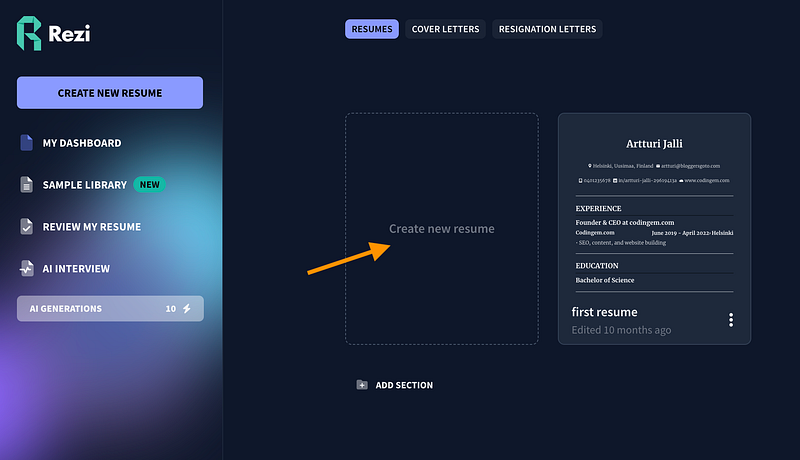
Next, tell the AI a bit about yourself. One thing I really like is the “Import your resume from LinkedIn” option. If your work history is already on LinkedIn, this saves a ton of time.

If you don’t have LinkedIn, just upload your resume and wait about a minute.
After it’s done, you can let the AI help tweak your CV, or make changes yourself.

Include your education:

The AI will create a clean resume for you—and even give it a score.

Of course, you’re not done yet. With Rezi, you can tweak things yourself, change the template, or let the AI adjust automatically.
It’s still pretty impressive. Instead of worrying about wording, layout, or design, the AI does most of the work. It shows your experience and skills in the best way possible.
Pros
- ATS-friendly resumes with keyword targeting
- Import from LinkedIn or upload a resume to save time
- Real-time scoring and suggestions to improve your match
- Clean templates and quick editing
- Active community and helpful guides
Cons
- Customer support can be hit or miss
- Scores don’t always match other scanners
- Some features require paid plans
- Takes some practice to get bullet points just right
- Pricing info can vary
Pricing
Free version available. Paid plans start around $2/month in promos, usually about $29/month depending on features.
2. SheetsResume AI
To create a resume with it, go to this page.

Pick one of the options in the top-right corner.

This lets you start from scratch, pull in your LinkedIn profile, or upload an existing resume.
I went with “Start with your LinkedIn Profile.” It then asks for your LinkedIn link.

Pretty clever, right? The AI looks at your LinkedIn info and work history, then builds your resume automatically.

Using that info, it makes the first version of your resume, optimized for ATS.
When it’s done, the AI resume editor opens automatically. If you used LinkedIn or uploaded a resume, most of the fields are already filled in.
Here’s a look at the first draft it made for me.

I know it’s a bit small, so let me zoom in.
On the left, you’ll see your personal details, work history, and more.

On the right, you’ll see a live preview of your resume. Anything you change on the left updates instantly on the right.

That’s super handy! No switching between windows or any extra hassle.
To build your resume, just fill in the details for each section.

You can also move things around easily in the editor by dragging and dropping.

You can use the AI to help write parts of your resume too.
For example, in the experience section, enter your company and job title, and the AI can create a stronger description for you.

You can also use AI to make your job title more appealing for a specific role.
For example, I typed “Coder” and clicked “AI Suggestions.” It gave me a bunch of better options.

You can use AI to find relevant, industry-specific certifications too.
For example, if you’re making a software developer resume, the AI can suggest certifications in your field, and you can add the ones you’ve earned.

In the interests section, you can use AI to suggest hobbies and interests instead of typing them all yourself.

Don’t forget to check the settings too.
Even though there’s only one template, you can still make a lot of changes here.

For example, you can:
- Optimize the layout
- Reorder your resume sections
- Pick a different font
- And, of course, get AI suggestions too!

Once you’re finished, it’s time to buy your AI-generated resume.
Right now, it costs $99 as a one-time payment for lifetime access—no recurring fees like most other tools.

SheetsResume is really solid. If $99 is too much, there are options:
- Free memberships for U.S. government workers affected by DOGE – email team@sheetsresume.com
- Financial Hardship Support – if $99 is too steep, email team@sheetsresume.com for a free 7-day membership to finish your resume
- Vocational discounts – students, military, teachers, and government workers get discounts at checkout
- Free DIY template – used by millions, available at SheetsResume.com/resume-template
Once you’ve paid, you can download your resume and start applying for jobs!

Pros
- One-time fee, no subscriptions
- Import from LinkedIn or an existing resume
- Real-time preview with drag-and-drop editing
- Discounts and hardship support available
- Free DIY template used by millions
Cons
- Only one template style (by design)
- Smaller ecosystem compared to big resume platforms
- Limited advanced design options
- $99 lifetime fee can still be a barrier (though help is offered)
- Focused on resumes, not a full job-search suite
Pricing
- Lifetime access: $99 one-time
3. Enhancv

Another solid resume builder is Enhancv. It helps you create or improve your CV from scratch.
Just sign up and click “Build your resume” to get started.

If you have a CV already, you can use it as input.

Enhancv has some handy templates.
Pick one you like—you can change it later. I went with the one that has a dark blue edge on the right.

After signing up, Enhancv asks for your LinkedIn profile.
This saves a lot of time since it pulls your experience and projects straight from LinkedIn, so you don’t have to type everything again.
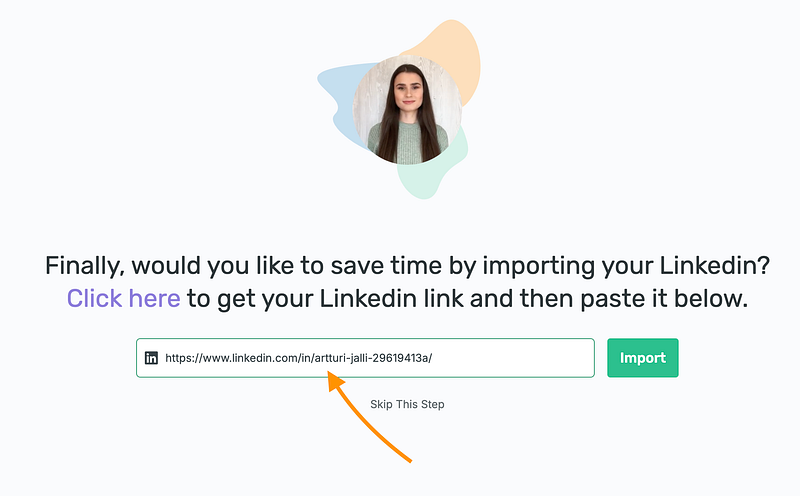
In about 30 seconds, Enhancv creates the first version of your new CV.
I’m curious—how does yours look so far?

Exactly—it’s just a starting point. You’ll need to tweak things. You can also reorder your projects.
Luckily, Enhancv lets you move sections around freely, which makes customizing your CV really easy.

You can tweak pretty much everything.
Add more rows or columns, adjust spacing, and change fonts and colors.

I like this because it saves a ton of time.
Instead of spending hours, I can just copy-paste my LinkedIn profile and get a ready-made CV in seconds.
Pros
- Polished templates with flexible sections
- Easy to reorder sections and tweak layouts
- Import from LinkedIn to jumpstart content
- Great for fast, professional-looking CVs
- Teams and brand options available
Cons
- Some features need higher-tier plans
- Not as ATS-focused as Rezi
- Template variety may feel limited for designers
- Export limits on lower plans
- You still need to customize bullets for each role
Pricing
- Quarterly, semi-annual, and annual plans; exact price shown at checkout depending on region/currency
AI Email Writers
One of the first everyday uses of AI was writing emails, since most emails follow simple patterns.
This was already possible before the AI boom—my first AI-assisted email was back in 2020.
Sure, you can still use free tools like ChatGPT or other email generators to quickly write an email. That’s not new.
The real value comes when you automate the whole email process—scheduling emails, sending follow-ups, and using AI-powered mailing systems.
Here are a few tools that do this.
1. MailMeteor

MailMeteor is an AI-powered email platform that does more than just write emails. You can send and schedule them all in one place.
This makes it different from tools like ChatGPT, which only generate text. MailMeteor handles the whole email process.
You can try it out with their free email generator.

I asked it to draft an email about my company’s strategy:

This part is free.
But to send emails, schedule them, or see analytics, you need to sign up for the platform.

Next, you can create a new email campaign.
This lets you write emails, schedule them, and track how they’re doing.

Just pick your recipients (if you have an email list), and you’re set.
You can also turn on “Track emails” to see who opened them, who unsubscribed, and other useful stats.

Since this isn’t an email marketing course, I’ll keep it short.
MailMeteor is an all-in-one tool that uses AI to write emails and send them at the best times.
Pros
- Simple Gmail mail-merge, easy to learn
- Built-in scheduling and tracking
- Good for straightforward campaigns
- Integrates well with Google Workspace
- Privacy-focused compared to bigger ESPs
Cons
- Limited automation and sequences compared to full ESPs
- Basic reporting
- Gmail sending limits
- Fewer CRM-style features
- Can feel small for complex workflows
Pricing
- Free
- Premium: $9.99/month
- Pro: $24.99/month
- Business: $49.99/month
2. WriteMail.ai

Another solid AI email tool is WriteMail AI, which works a lot like MailMeteor.
For example, I used it to draft an email to my local tennis coach about a possible partnership.

It takes about 15–30 seconds to create the email.
Here’s my result:

Check that out! It’s pretty detailed, especially since I only gave it one sentence to work with.
Of course, you should double-check everything and make a few edits.
WriteMail AI isn’t as full-featured as MailMeteor, but it’s great for writing emails faster and more efficiently with AI.

That’s exciting! WriteMail AI is planning a Chrome extension soon.
This will let you write and send emails straight from your inbox, making things much easier.

Definitely give it a try!
Pros
- Super fast email drafting from short prompts
- Gmail extension for writing directly in your inbox
- Handy mini-tools like a free email signature generator
- Multilingual support and “polish” features
- Great for beginners who want AI help with phrasing
Cons
- Full plan details aren’t clearly published
- Email limits on lower tiers
- Some users feel it offers less value than competitors at the same price
- Integrations aren’t always seamless
- Smaller ecosystem and community compared to big ESPs
Pricing
- Free tier available
- Basic: ~$12/month
- Pro: ~$20/month (caps apply)
My Overall Take on AI Writers
Honestly, AI text generators aren’t as impressive as people hype them up to be.
Content creation isn’t just about writing—it’s about research and effort.
If you rely only on an AI bot, your content might not get much attention. Social platforms can filter it out—I’ve seen it happen.
The problem isn’t that AI writes; it’s that it doesn’t add anything new. That’s why using AI alone for blog posts or social media isn’t a smart move.
As a blogger, I’d say AI saves me maybe 2–5% of my time—not the huge 5x or 10x boost some reviews claim.
I like AI, and it’s worth experimenting with, but for now, it’s mostly hype. It’s an assistant that saves a few minutes—not a magic content machine.
Hope you find it useful!
